What an Indoor Mapping Platform Actually Does (and How to Evaluate One in 2026)
Jean-Thomas Rouzin - Reading time : 10 min
Table of contents
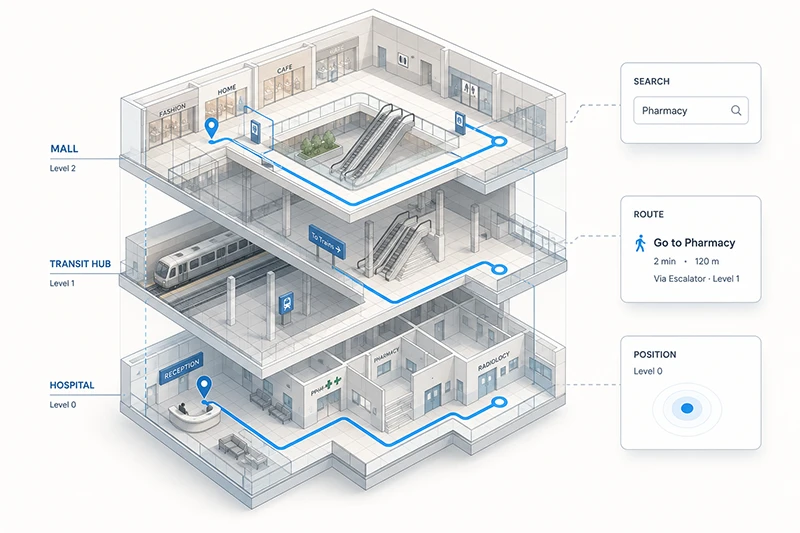
An indoor mapping platform turns building floor plans, point-of-interest data, routing networks, and positioning signals into a set of APIs and SDKs that a business application can consume. It is not a consumer wayfinding app, not a CAD tool, and not "Google Maps inside". For a decision-maker, the real question is which platform is worth standardizing on, and on what evidence.
What sits behind the words "indoor mapping platform"
The category is younger and noisier than outdoor maps, so the term gets used loosely. Three things are routinely conflated:
Indoor mapping is the digital representation of a venue : floor plans, levels, points of interest, walkable paths, accessibility data. It is a dataset and an API to query it.
Indoor positioning is the live location of a person or asset inside that venue : a "blue dot" produced by some mix of GPS, BLE beacons, Wi-Fi RTT, or geomagnetic fingerprinting.
Indoor wayfinding is the user-facing experience built on top of both : the turn-by-turn instructions, the contextualized cues, the multi-floor routing screen.
A platform worth buying ships all three as composable APIs and SDKs, so your team is not stitching three vendors together. A platform you should not buy ships only one of them and asks you to integrate the rest yourself.
What an indoor mapping platform is not : it is not a BIM or CAD tool (it consumes their output, it does not draw it), it is not a one-off SVG floor plan export, and it is not a consumer-facing navigation app. The product is the infrastructure your application calls, not the screen your end-user sees.
Why retailers, transit hubs, and venues invest in one
The business case rarely starts with "we need a map". It starts with one of four outcomes :
Visitor experience and conversion. Multi-floor retailers, malls, and outlets lose customers between "I see the store online" and "I find the right department". A directory-grade map answers "where is it" ; an indoor mapping platform answers "how do I get there from here, with my stroller, in three minutes".
Operations efficiency. Staff in hypermarkets, hospitals, and large warehouses spend a measurable fraction of their day walking the wrong way. Indoor routing for staff, particularly for pickers preparing click-and-collect orders, returns minutes per task that compound into headcount savings.
Accessibility and safety. Mobility profiles - wheelchair, stroller, restricted access for security staff - are now an explicit procurement requirement in transit hubs, healthcare facilities, and large public venues. Emergency egress routing and asset tracking sit in the same evaluation.
Data ownership and visitor intelligence. A platform that processes location queries against your own venues should not leak that data into a competing ad ecosystem. For DPOs and legal teams in EU-headquartered companies, where the data is hosted and who else can use it is a hard gate.
These outcomes do not all come from the same audience, which is why the platform you pick is rarely the responsibility of a single team. CMOs care about conversion, COOs care about ops, CTOs care about integration cost, and DPOs care about data residency. A good evaluation aligns the four before issuing an RFP.
The five components a real platform ships
Strip away the brochures, and a usable indoor mapping platform reduces to five working parts. Any gap here means you will be paying a system integrator or a partner to fill it.
1. Floor plan data production. Someone has to turn the architect's PDF into a structured, geo-referenced, multi-floor digital map. Some platforms (Esri ArcGIS Indoors, MapXus) ship sophisticated tooling and ask you to do it. Others (Pointr, Woosmap Indoor) bundle a cartography team that does it for you. The trade-off is control versus speed-to-launch.
2. POI and data back office. Stores, gates, lounges, rooms, and assets change every week. A platform without a usable back office quickly becomes stale. Look for a console that your operations team - not just developers - can use to edit a label, add a temporary popup, or close a corridor for maintenance.
3. Routing engine. Real indoor routing is harder than outdoor : floors, lifts versus stairs, restricted areas, mobility profiles, dwell time. The routing API should return paths, ETAs, and turn-by-turn instructions, ideally with the option of contextual cues ("turn left after Starbucks") rather than only metric instructions ("turn left in 12 m").
4. Positioning support. A platform should not lock you into a single positioning technology. The right answer for a 200-room hotel (QR codes at room entrances) is not the right answer for an airport (BLE beacons or Wi-Fi RTT) or a hospital (hybrid BLE plus geomagnetic). Expect support for GPS fallback, BLE, Wi-Fi, geomagnetic, and QR, with the option of an IPS partner network rather than a single hardware bet. For the underlying tech, our complete guide to indoor navigation goes into BLE, Wi-Fi, and geomagnetic fingerprinting in detail.
5. SDKs and APIs. A REST API and a JavaScript widget are the minimum. Native iOS and Android SDKs, plus React Native or Flutter, are the production reality. A widget alone will not survive contact with a serious mobile team.
A useful filter : if a vendor cannot demonstrate all five in a 30-minute screen-share, treat the gap as a multi-month integration cost on your side.
Vendor landscape : who actually plays in this category
The market is fragmented. Different vendors optimize for different venues, different data ownership postures, and different integration footprints. The table below is a structural map of who plays in which corner, not a leaderboard.
EU venues, retail-curated, contextual turn-by-turn
EU-hosted infrastructure ; cartography team included ; data ownership (client is sole owner of mapped data) ; partner IPS network
Smaller global indoor catalog than US giants ; deepest references are EU retail, transit, and venues
Two structural observations behind that table. First, the platforms that originated in GIS (Esri, MapXus) tend to ask more of your team and reward you with depth. The platforms that originated in mobile experience (Pointr, MappedIn, Woosmap Indoor) tend to ship faster but ask you to accept their opinionated map-production workflow. Second, the big-cloud entries (Azure Maps Creator, Google Maps Platform Indoor, Apple Indoor Maps for Business) are most attractive when your application already lives inside their ecosystem - and least attractive when data residency or vendor neutrality is a hard requirement.
A neutral data standard exists for floor plans : IndoorGML, an Open Geospatial Consortium standard. If a vendor cannot import or export to IndoorGML or to Apple's IMDF, your floor plan data is effectively locked in.
Five questions to ask before you sign
Most evaluations stall on features. The questions that actually decide the contract are upstream.
1. Who owns the mapped data? Read the contract clause that covers the digital floor plans, the POI database, and any operational edits your team makes. The right answer is "you do, and you can export it in IndoorGML or IMDF". A wrong answer leaks your asset into someone else's product.
2. Where is the data hosted, and what does that mean under GDPR? For an EU-headquartered controller, infrastructure that routes through the US triggers Schrems II analysis and Article 44 documentation. EU-hosted indoor mapping infrastructure is not a marketing claim, it is a legal de-risking. Ask for the data flow diagram.
3. What positioning options does it support, and at what hardware cost? A BLE-only platform is a budget commitment in beacons. A Wi-Fi RTT platform requires compatible access points. A QR-only platform is cheap but coarse. The right answer is a platform that supports several, with a partner network, so the positioning decision can be made per venue, not per vendor.
4. How does it integrate with your CRM, marketing, and analytics stack? Indoor mapping is most valuable when geofencing notifications, dwell-time analytics, and click-and-collect flows reach it. Native integrations with Airship, Braze, Batch, Salesforce, and your analytics pipeline shorten the project by weeks.
5. What is total cost of ownership at your real scale? Get the all-in number, not the per-API quote : map production (one-off or yearly), platform license, positioning hardware if any, integration cost, ongoing operations. For multi-site retailers, the ongoing operations cost - keeping the maps current - is usually the line item that surprises buyers.
Build versus buy : when each makes sense
Custom-building an indoor mapping stack is reasonable in exactly one scenario : you have a single venue with stable layout, an in-house GIS team, and no need to expand. Everything else (multi-site, frequent layout changes, multi-team consumers of the data) collapses the build option once you cost the maintenance.
A reasonable rule of thumb : if more than three teams in your organization will consume indoor location data within twelve months - marketing, operations, accessibility, security, customer support - buy the platform. The integration costs of in-house spread faster than the licensing line.
Frequently Asked Questions
No. Indoor mapping is the data and the APIs - floor plans, POIs, routing graph, positioning support. Indoor wayfinding is the user-facing experience built on top : the screen with the blue dot, the turn-by-turn cues, the multi-floor switcher. An indoor mapping platform is the infrastructure ; an indoor wayfinding app is one of several applications that can be built on it. The same platform can also power staff routing, asset tracking, geofencing campaigns, and emergency egress, none of which is "wayfinding" in the consumer sense.
Not necessarily. BLE beacons remain the most accurate positioning option in venues without strong Wi-Fi infrastructure, but they are an investment. Wi-Fi RTT, geomagnetic fingerprinting, and QR codes at known points all work as alternatives or supplements, with different accuracy and cost profiles. A platform that locks you into one positioning option is making the decision for you ; a platform with a partner network for IPS lets you pick the right answer per venue.
The OGC IndoorGML standard represents indoor spaces, including geometry, semantics, and topology. The Indoor Mapping Data Format (IMDF) is Apple's open data format used for Apple Indoor Maps for Business. Both matter because they make your floor plan data portable. A platform that supports import and export to either format reduces vendor lock-in.
In a well-instrumented venue, BLE beacon networks routinely deliver positioning accurate to within a few meters, sufficient for turn-by-turn guidance and aisle-level retail context. Wi-Fi RTT can match that in modern stacks. Geomagnetic fingerprinting is competitive once a venue is mapped. GPS alone is unreliable indoors because building materials attenuate the signal and elevation is lost. The honest answer : accuracy is a function of the venue, not the platform.
You should be able to. Read the contract clause that covers ownership of mapped data and the export format. The clear answer is that you own the floor plans and can export them in IndoorGML or IMDF. If the vendor cannot offer that, treat the data as locked in and price the exit cost into the deal.
For a single mid-sized venue (mall, station, hospital), the map production phase typically runs four to eight weeks if the vendor's cartography team handles it from architectural plans. Application integration - SDKs, routing API calls, positioning integration - usually runs in parallel and takes a similar window. Multi-site rollouts are dominated by the cartography pipeline ; plan for staged go-lives, not a single cutover.
Where to go next
Two next steps that map cleanly to the path most evaluations take :
If you want to go deeper on the technical mechanics of indoor positioning - GPS limits, BLE, Wi-Fi, geomagnetic - our complete guide to indoor navigation covers what any platform you pick will rely on.
For a structured comparison of Woosmap Indoor against your shortlist - including a working session on data ownership, positioning options, and TCO at your real scale - talk to our team.
This guide was written byJean-Thomas Rouzin, CEO of Woosmap. Jean-Thomas leads a European location intelligence platform serving 220+ enterprise clients across retail, logistics, and travel, processing 28B+ location context calls per year with a 99.9% SLA on the Enterprise plan.